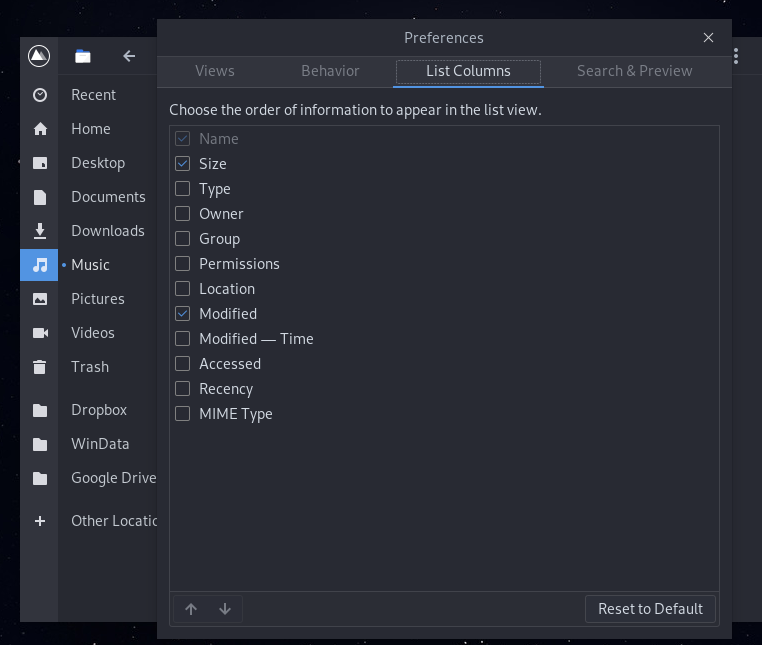
listening Installed Budgie desktop. Using nautilus file manager and viewing media files there is no "detailed information tab". Is there an extension that enables it? I would like to see the bit rate, resolution, frame rate, etc. Thjank you
algent You mean this. I don't have those options too. I think you have to ask the developers about that. It is not a Solus thing.
listening algent Other distros I have used have the detailed tab and it is very useful. It's nautilus so you would think there would be a setting somewhere. Cheers
Justin listening Which other distros and using which file manager? We may be able to see how they're supplying the extra info.
brent As a fellow person who NEVER views thumbnail files and ONLY views detailed/list files in any file manager I wonder...Nautilus is built for efficiency.. You have a small niche of distinct file types (of all the files on OS) you need the bitrate, etc so ergo efficiency. I'm using dolphin too for the drop down folders. Have you explored the repo options? If you need that info you need that info. In other words, you can probably find the solution here (?) then make your own default FM.
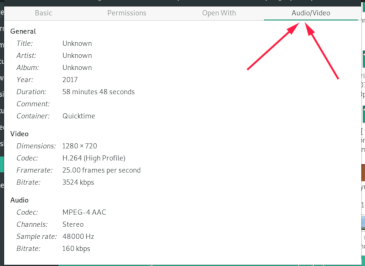
CraigMatze If you look at an individual file song/video - right click - properties - audio/video tab has all the info.
listening Here is a image of the nautilus file manager in manjaro budgie and as you can see there is an audio/video tab that gives media information. In Solus I also tried the Dolphin file manager and it did not have the extra tab either. I looked in the Solus software centre and there was nothing I could find to add this feature. Cheers 🙂
algent listening Asked about that because, it is not working on nautilus-legacy. Probably I should try it again with Nautilus 3.32.
Mr_Magoo Nautilus root priviledge? I am new to Solus and Nautilus and apprentice in Linux. In Debian, I use Thunar which has a usefull tweak to access folder with admin permission. I have search in web documents for Nautilus and did not find such reference.