kyrios
grep -o vmx /proc/cpuinfo | uniq
vmx
lscpu
Architecture: x86_64
CPU op-mode(s): 32-bit, 64-bit
Byte Order: Little Endian
Address sizes: 39 bits physical, 48 bits virtual
CPU(s): 4
On-line CPU(s) list: 0-3
Thread(s) per core: 1
Core(s) per socket: 4
Socket(s): 1
NUMA node(s): 1
Vendor ID: GenuineIntel
CPU family: 6
Model: 94
Model name: Intel(R) Core(TM) i5-6300HQ CPU @ 2.30GHz
Stepping: 3
CPU MHz: 800.029
CPU max MHz: 3200.0000
CPU min MHz: 800.0000
BogoMIPS: 4608.00
Virtualization: VT-x
L1d cache: 32K
L1i cache: 32K
L2 cache: 256K
L3 cache: 6144K
NUMA node0 CPU(s): 0-3
Flags: fpu vme de pse tsc msr pae mce cx8 apic sep mtrr pge mca cmov pat pse36 clflush dts acpi mmx fxsr sse sse2 ss ht tm pbe syscall nx pdpe1gb rdtscp lm constant_tsc art arch_perfmon pebs bts rep_good nopl xtopology nonstop_tsc cpuid aperfmperf tsc_known_freq pni pclmulqdq dtes64 monitor ds_cpl vmx est tm2 ssse3 sdbg fma cx16 xtpr pdcm pcid sse4_1 sse4_2 x2apic movbe popcnt tsc_deadline_timer aes xsave avx f16c rdrand lahf_lm abm 3dnowprefetch cpuid_fault epb invpcid_single pti ssbd ibrs ibpb stibp tpr_shadow vnmi flexpriority ept vpid ept_ad fsgsbase tsc_adjust bmi1 hle avx2 smep bmi2 erms invpcid rtm mpx rdseed adx smap clflushopt intel_pt xsaveopt xsavec xgetbv1 xsaves dtherm ida arat pln pts hwp hwp_notify hwp_act_window hwp_epp md_clear flush_l1d
sudo eopkg up
I have a fully updated system.
edit1:
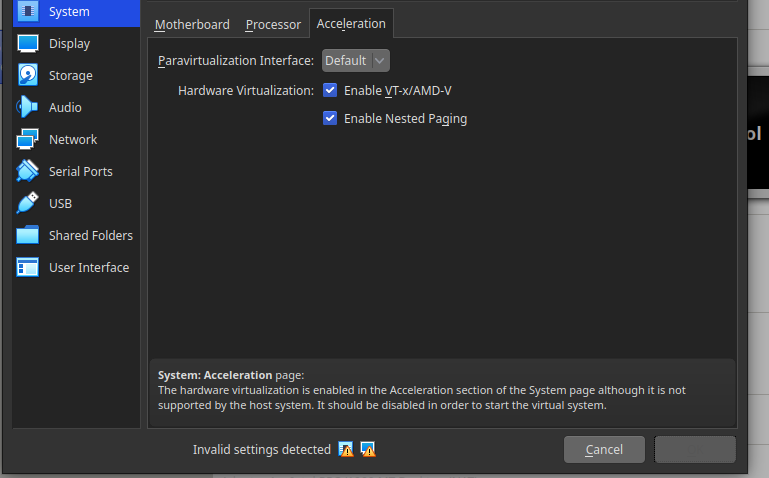
The problem with hardware virtualization was solved by changing the size of RAM to smaller (weird).
Unfortunately, a new problem has appeared - vagrant stood at "SSH auth method: private key" and then exit by "Timed out while waiting for the machine to boot.".

Could this be associated with a firewall? How to check it?
edit2:
After enabling gui (gui = true in Homestead.yaml) the following error appears in the virtualbox dialog:
VT-x/AMD-V hardware acceleration is not available on your system.
Your 64-bit guest will fail to detect a 64-bit CPU and will not be able to boot.
edit3:
Restoring the bios to the factory settings and reconfiguration helped. Thanks for your time.