We have Linux and macOS instructions for verifying the ISO and file signatures at https://getsol.us/articles/installation/preparing-to-install/en/#verifying-the-iso
No documentation is written for Windows yet. You don't "open" the sign file either and generally checking it is overkill v.s. just getting the sha256sum of your ISO and comparing it to the one we have posted via the .sha256sum files posted here, which you can open in Notepad.
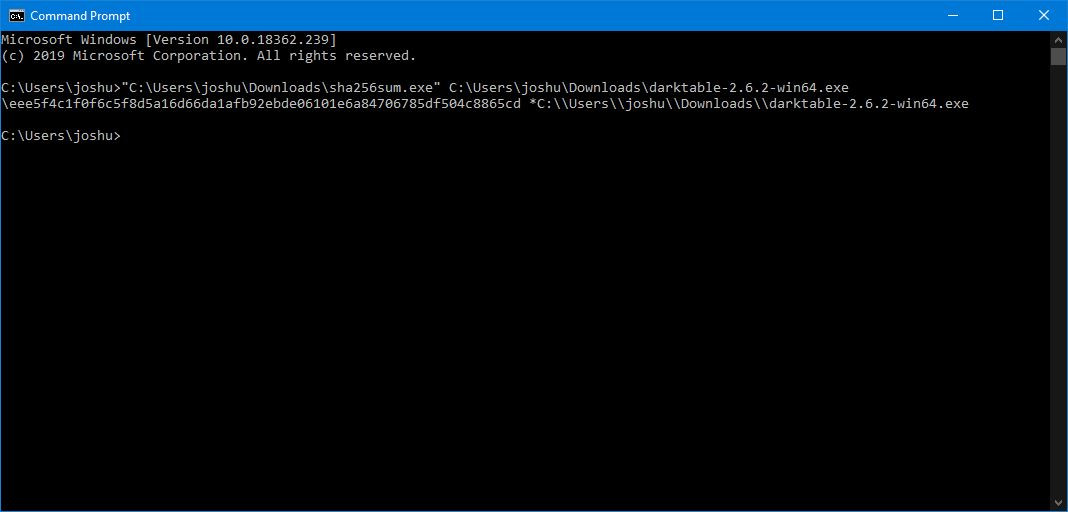
There is a known third-party sha256sum.exe implementation on Windows that will compute and display hashes. It's a single EXE file that can be run from any path in a Command Prompt, such as your downloads folder or a secondary USB. It's downloadable here. Below is an example of me using it on a random file.
That being said, if you believe your Windows 8.1 install is compromised, I'd advise first fixing that issue before installing Solus. I haven't had to deal with viruses under Windows for many years now, hell I don't even use an anti-virus on it aside from Windows Defender (I only browse and get files from reputable sources and typically Windows is used for gaming, games which are genuinely only acquired through gaming platforms, etc.) so I can't really advise you on, or condone any, specific solution for the detection and removal of viruses, malware, etc. Until then, you really shouldn't expect any activity you perform on your system (unless it's quite literally zeroing your drive / nuking and paving) to not potentially be without some flaw or being compromised itself.
I do know that there are some available bootable viruses / malware scanning and removal solutions that can be used from a USB (as an ISO, similar to what you'd do for Solus) however, that may be your best bet.
If you opt to just nuke and pave, I strongly advise installing Windows first, then using its built-in disk manager to create free space for Solus to install to, then using the install side-by-side support in the Solus installer. And remember that if you're on a UEFI system, follow our documentation for creating a dedicated ESP (EFI System Partition) for Solus too!
