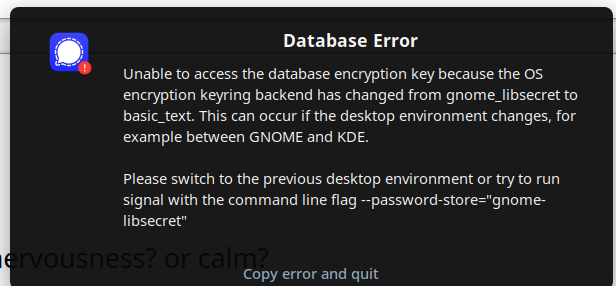
The first suggestion in the thread about 'making a back up' didn't work of course because the 'path' is not correct.
After checking with ChatGPT, and trying to find the issue with a number of terminal commands, the issue does seem to lie with the 'path', and, most likely it's tied to the recent major revamp to the Software Center.
I checked the Software center first and saw that Signal was not installed (nor was it installed when I 'flatpak list' in terminal)
I cleaned the cache of Signal (I think), did managed to make a back up (I think), and installed using the GUI in the Software center. Now when I 'flatpak list' in terminal, it does list Signal.
Only now I have two icons in the GUI dropdown of all listed apps, 'Signal' and 'Signal Desktop'. Since the one listed in the flatpak is the latter, I clicked on that one first, same issue (I think, am already forgetting) with the 'Database Error' pop up, so I tried the other one, at which point I get a pop up to enter a 'key ring', no clue as to what to do (no time to learn), so I just hit cancel like three times, then this pop up appeared offering 'Scan this code on the Signal app on your phone', which look like it will sync with my phone (cool!), but, alas, since we don't have power my internet is too weak. I'll try when we get electricity...