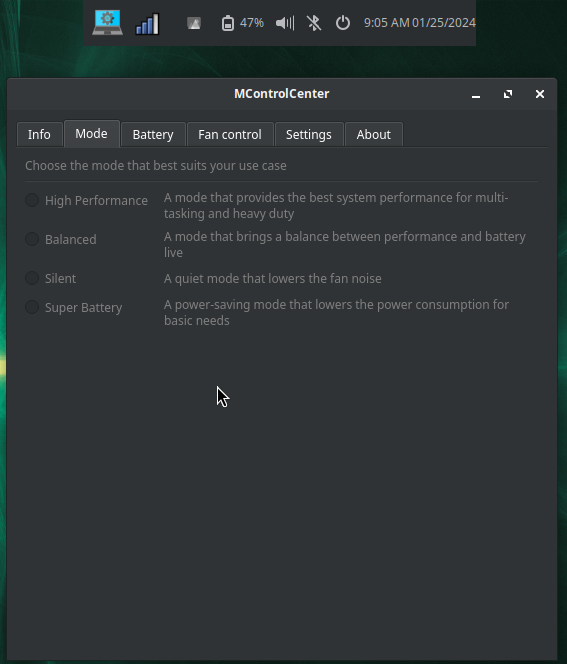
For those who want to use MControlCenter correctly on Solus (as of December 2025), I'll leave the steps that led me to the correct installation (but please be careful as you'll need a module that is not installed and I'm not sure about what the outcome will be for everyone).
Also be careful and read everything at https://github.com/dmitry-s93/MControlCenter in order to check which MSI laptops can work. My Vector GP68 HX 13V is working, for example.
It's necessary to install msi_ec, which is not present in the kernel https://github.com/BeardOverflow/msi-ec?tab=readme-ov-file#installation
Tools we need:
sudo eopkg install linux-current-headers gcc make binutils
Then follow the instructions at the link above. You'll download the files, cd into the folder and:
sudo mkdir -p /etc/modules-load.d && make && sudo make install
At this point I had to override the module:
sudo insmod ./msi-ec.ko ignore_dmi=1
Load automatically ec_sys and msi_ec
echo "ec_sys" | sudo tee /etc/modules-load.d/ec_sys.conf
echo "msi_ec ignore_dmi=1" | sudo tee /etc/modules-load.d/msi_ec.conf
sudo depmod -a && sudo modprobe msi_ec && sudo modprobe ec_sys
At this point download the mcontrolcenter tarball (we don't have a package for that, as long as I know) https://github.com/dmitry-s93/MControlCenter
sudo eopkg qt6-base (but probably we already have this package installed)
Unzip it, cd into the folder, use sudo ./install as shown in the instructions.
At this point mcontrolcenter should be available in the launcher. At least it is in my OS, and I'm able to change fans, power profiles and so on.
Additional steps I made in order to make it work at reboot (since I used insmod the first time to test it; also careful because /lib/modules path might be different for you, especially if you have a different kernel than mine in this moment I'm writing):
sudo nano /usr/local/bin/load-msi-ec.sh
Content:
#!/bin/sh
# aspetta che il sistema sia completamente pronto
sleep 10
# carica ec_sys se non già caricato
modprobe ec_sys || true
# carica msi_ec solo se non è già presente
if ! lsmod | grep -q "^msi_ec"; then
insmod /lib/modules/$(uname -r)/extra/msi-ec.ko ignore_dmi=1 || true
fi
exit 0
sudo chmod +x /usr/local/bin/load-msi-ec.sh
sudo nano /etc/systemd/system/msi-ec.service
Content:
[Unit]
Description=Load MSI EC driver (delayed)
After=multi-user.target
Wants=multi-user.target
[Service]
Type=oneshot
ExecStart=/usr/local/bin/load-msi-ec.sh
RemainAfterExit=yes
SuccessExitStatus=0
[Install]
WantedBy=multi-user.target
sudo systemctl daemon-reexec && sudo systemctl enable msi-ec.service && sudo systemctl start msi-ec.service
Unfortunately this needs to be done every time the kernel is updated as we don't have dkms.
I might switch to the kernel LTS, but that is updated as well, so I'm not sure how much it can help.